Art Marketing
Art marketing software for artists and galleries: how to choose the right tool

Art marketing software helps artists and galleries present their work, reach collectors, and turn interest into sales. The right tool depends on how you sell: online, at fairs, through your own website, or all three. Choosing well saves time, avoids a costly website rebuild, and keeps every collector conversation in one place.
Most artists and galleries end up juggling several tools: one for mockups, another for contacts, a third for their website. This guide is here to simplify that choice. We’ll walk through what to look for, from visualization and exhibitions to website integration, collector management, and ease of use. Along the way, we’ll see how ArtPlacer, Artlogic, Artwork Archive, FASO, and Art Storefronts compare, and where each fits best. Discover why, if you want one tool that covers it all, ArtPlacer is the only one that does.
Contents
How do I choose art marketing software?
Most tools for artists and galleries cover one or two parts of the sales process. Look for a tool that covers all or most of them according to what best fits your art business goals.
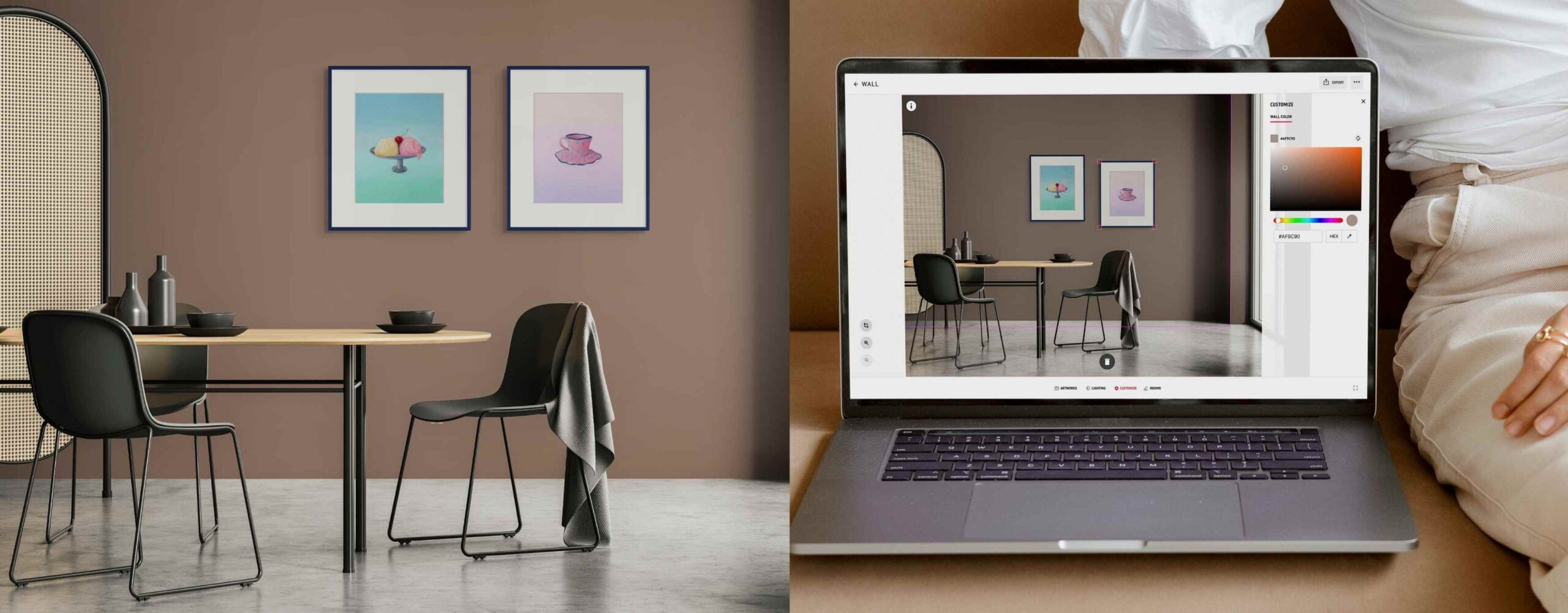
1. Realistic artwork visualization. Helping collectors visualize living with your pieces is paramount to your marketing. A wall art mockup library removes the biggest barrier to buying art online: uncertainty about size and fit. Look for a variety of interiors, from living rooms to hotel lobbies. The best art marketing tools also let you place work in a collector’s own space.
2. Exhibition capabilities. Can it present paintings, sculptures, videos, and NFTs in a navigable 3D space? A strong virtual exhibition platform lets you customize venues, add information, and embed the show on your site. You should also be able to easily plan and prep for in situ shows and fairs. Look for an art show planner that lets you set up a booth digitally to try out layouts so you can get organized for a physical show, saving time and money.
3. Integration with your website. Does the tool plug into the site you already run, or force you to create a new one? Rebuilding a website costs time, search rankings, and collector familiarity. Look for an embeddable art visualizer for website product pages that works with Shopify, Squarespace, WordPress, Wix, or custom sites.
4. Collector and lead management. Can you capture leads where collectors actually view your art, and help you follow up? An art gallery CRM should pull inquiries from every touchpoint into one inbox. The strongest tools let you follow up with visuals, such as room visualizations or curated presentations, for a personalized experience.
5. Ease of use, support, and transparent pricing. Can your team run it without technical help, and is the price clear upfront? Look for published pricing, a free trial, and cancel-anytime terms. For galleries, a dedicated account manager at an accessible tier matters more than enterprise-only support.
The best marketing tools for art galleries meet all five criteria in one subscription. That way, presentation, sales, and marketing work together.

Choose an art marketing tool that lets you display your art in a professional, polished way. Use it to create high quality images and content for your webiste, social media, and client communications.
Art marketing software options for artists and galleries, side by side
| Criteria | ArtPlacer | Artlogic | Artwork Archive | FASO | Art Storefronts |
|---|---|---|---|---|---|
| Best for | Artists, galleries, and art advisors who want to visualize, present, and sell art alongside their existing website | Established galleries that want an all-in-one gallery management system | Artists and collectors who need detailed inventory tracking with a built-in CRM | Independent artists who want a templated website with built-in ecommerce | Photographers, print studios, and artists focused on selling prints |
| Artwork visualization | Yes | Partial | No | Partial | Partial |
| Collector and lead management | Yes | Yes | Yes | Partial | Partial |
| 3D virtual exhibitions | Yes | Partial | Partial | No | No |
| Physical show planning | Yes | No | No | No | No |
| Integration with your existing website | Yes | No | Yes | No | No |
| Dedicated support | Dedicated account manager from $45/month | Dedicated account manager on Expert tier | No | No | Onboarding support rep |
| Multi-user access | Yes | Yes | Yes | Not published | Not published |
| Free trial | Yes | Yes (length not published) | Yes | Yes | No |
| Starting price | $9/month ($8/month billed annually) | £156/month for galleries, £95/month for artists | $9/month billed annually ($10 monthly) | $12/month billed annually | Not published |
(Pricing checked September 2026)
- When it comes to realistic visualization, ArtPlacer is the only platform with a full room mockup library and custom room capabilities. ArtPlacer, Artlogic, FASO, and Art Storefronts all have augmented reality capabilities that show art in the viewer’s own room.
- Artlogic, Artwork Archive, and ArtPlacer all offer strong collector management software. ArtPlacer also links leads to the tools collectors use to view art.
- Only ArtPlacer covers online and physical shows, with 3D virtual exhibitions and an art show planner.
- When it comes to website integrations, most tools require you to build on their platform. ArtPlacer offers art visualization features that plug into existing sites.
- Most tools offer transparent pricing and include a free trial. ArtPlacer includes a dedicated account manager starting at $45/month, while Artlogic reserves one for its top tier.

Personal support, like a dedicated account manager, makes it easier for teams to adopt a new tool and make the most of its features.
What are the best art marketing tools for artists and galleries?
ArtPlacer
Best for: Artists, galleries, and art advisors who want to visualize, present, and sell art, and are looking for a single tool that combines all those capabilities.
Buying art is an emotional decision, and doubt is usually what stops it; collectors want to know a piece will suit their space and their style. ArtPlacer is built to answer that question before they even have to ask it. Display your work at scale in beautiful rooms from the Room Mockup Library, or use a photo of the collector’s actual room to create a personalized Mockup. You can also add visualization tools to your Shopify, Squarespace, WordPress, Wix, or custom site through Website Integrations. Try-before-you-buy plugins like the Augmented Reality Widget let collectors see the work in whatever room they’re standing in, directly from their phone.
Interest in art rarely turns into a sale on the first visit. It builds over time, through conversations and small moments of connection. ArtPlacer keeps those moments in one place. Every inquiry becomes a contact, whether it came from a Viewing Room, a Virtual Exhibition, or a fair. When it’s time to follow up, you can send custom material created with ArtPlacer instead of a plain email. Collectors see the work in context, and the conversation feels personal.
Exhibitions are where your work gets seen, and ArtPlacer helps each one reach further. Virtual Exhibitions give your shows a 3D home online, open to collectors anywhere, at any hour. For physical shows and fairs, the Art Show Planner helps you find the right layout before anything is moved. That means less handling, fewer surprises, and more time for the work itself. Together, these tools cover the full path from first look to final sale.
Limitation: ArtPlacer isn’t a website builder or ecommerce platform. It works alongside the site and online store you already run, and gives you the option to create a microsite hosted by ArtPlacer.
Pricing: From $9/month, or $8/month billed annually, with a 14-day free trial that can be cancelled anytime.

ArtPlacer’s Room Mockup Library offers more than 2,900 spaces to show art at scale in styled settings.
Artlogic
Best for: Established galleries that want an all-in-one gallery management software system, including inventory, website, and sales pipeline.
Artlogic combines inventory management, a gallery website, email marketing, and sales tools. Galleries can send offer emails and Private View presentations to collectors. Higher tiers add sales pipeline management, offer tracking, and sales reporting.
Artlogic presents shows through online viewing rooms rather than navigable 3D exhibitions. Its websites run on Artlogic’s own platform, so switching usually means migrating your existing site. The website plans also include View on a Wall and augmented reality features for previewing artwork. You can start with a free trial or book a personalized demo.
Limitation: No room mockup library, 3D virtual exhibitions, or show planning tools. The starting price suits established galleries more than independent artists.
Pricing: Full gallery platform from £156/month; artist platform from £95/month. Individual modules are priced separately. Expert tier pricing on request.
Artwork Archive
Best for: Those looking for detailed inventory tracking with a built-in CRM.
Artwork Archive is art inventory software first. It tracks pieces, locations, editions, sales, and documents, with invoicing and advanced reporting. An integrated CRM is included on every plan. The Professional plan adds a sales pipeline and Private Rooms for sharing curated collections.
From that plan up, you can embed your public piece data on WordPress, Squarespace, or any site. Virtual exhibits are available on organization plans, not on artist plans.
Limitation: No room mockups or 3D exhibitions on artist plans. Presentation tools are limited to Private Rooms and a public profile.
Pricing: Artist plans from $9/month billed annually. Organization plans with virtual exhibits start at $39/month billed annually. 14-day free trial, no credit card required.
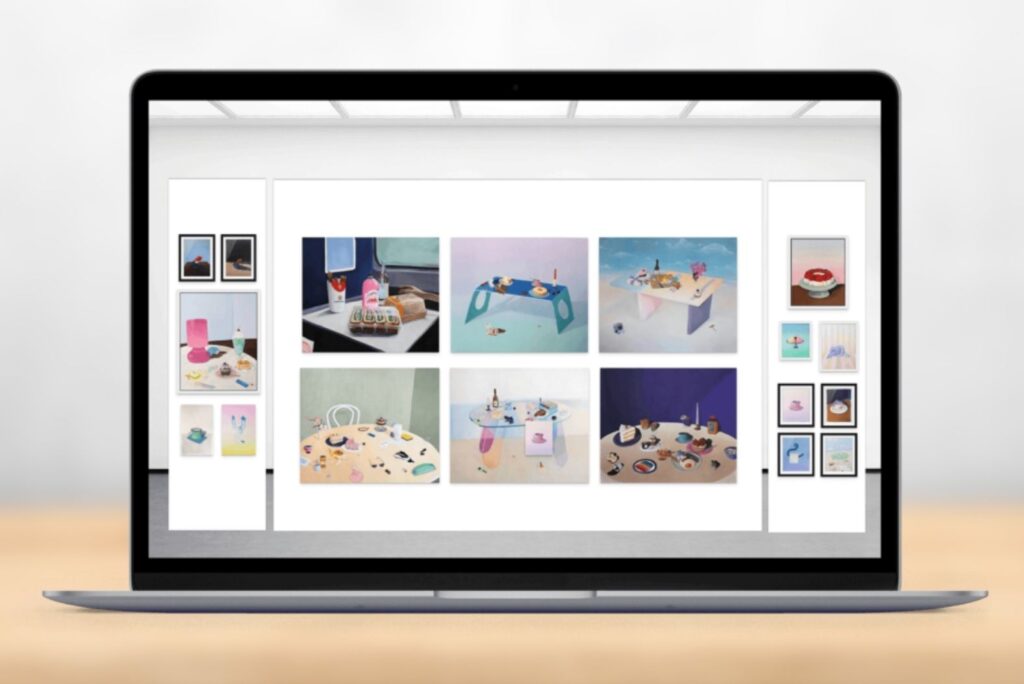
ArtPlacer’s Art Show Planner lets artists and galleries lay out physical shows to scale before hanging a single work, saving time and money and avoiding art wear.
FASO
Best for: Independent artists who want a templated art website with built-in ecommerce and marketing education.
FASO provides mobile-friendly artist websites with integrated ecommerce, a blog, and email newsletters. Every plan includes print-on-demand, so buyers can order framed prints shipped directly to them. Members also get the BoldBrush art marketing guidebooks, webinars, and a private artist community.
Mid-tier plans add a View in Room feature and an AR preview on artwork pages. FASO also offers Squarespace-based sites for artists who want more design control.
Limitation: You need to host your site with FASO or its Squarespace service. There’s no CRM beyond newsletters, limited art visualization options, and no 3D exhibitions or gallery tools.
Pricing: From $12/month billed annually. Free trial, no credit card required.
Art Storefronts
Best for: Photographers, print studios, and artists focused on selling prints through their own ecommerce website.
Art Storefronts builds ecommerce websites designed around print sales. You can fulfill orders yourself or use Art Storefronts’ print fulfillment service. The platform includes an AR tool, custom watermarks, SEO tools, and an order and earnings center.
New members get a dedicated support rep during onboarding. The team also offers marketing guidance through its blog, podcast, and private community.
Limitation: Very limited art visualization capabilities. No 3D exhibitions, show planning, or integration with an existing website. Access requires an introductory call before you can see pricing.
Pricing: Not published. Pricing is shared after a 5- to 10-minute introductory call and demo.
Every Room Mockup in ArtPlacer’s library can become a cinematic video perfect for social media.
What visualization features should an art marketing tool include?
Visualization is the first feature to evaluate, because it affects every sale. Collectors hesitate when they can’t picture a piece in their own space. Size, scale, and style are the most common questions before a purchase. The right tool answers them before collectors ask and creates fresh content for social media, newsletters, and your website.
Realistic rooms at true scale. Collectors need to see a piece in a setting that feels like real life. Look for a tool that lets you place your art in a wide range of interiors, with accurate scale, and gives you control over frames and lighting. ArtPlacer’s Room Mockup Library offers more than 2,900 rooms, from bedrooms and offices to lobbies and restaurants, to display your art.
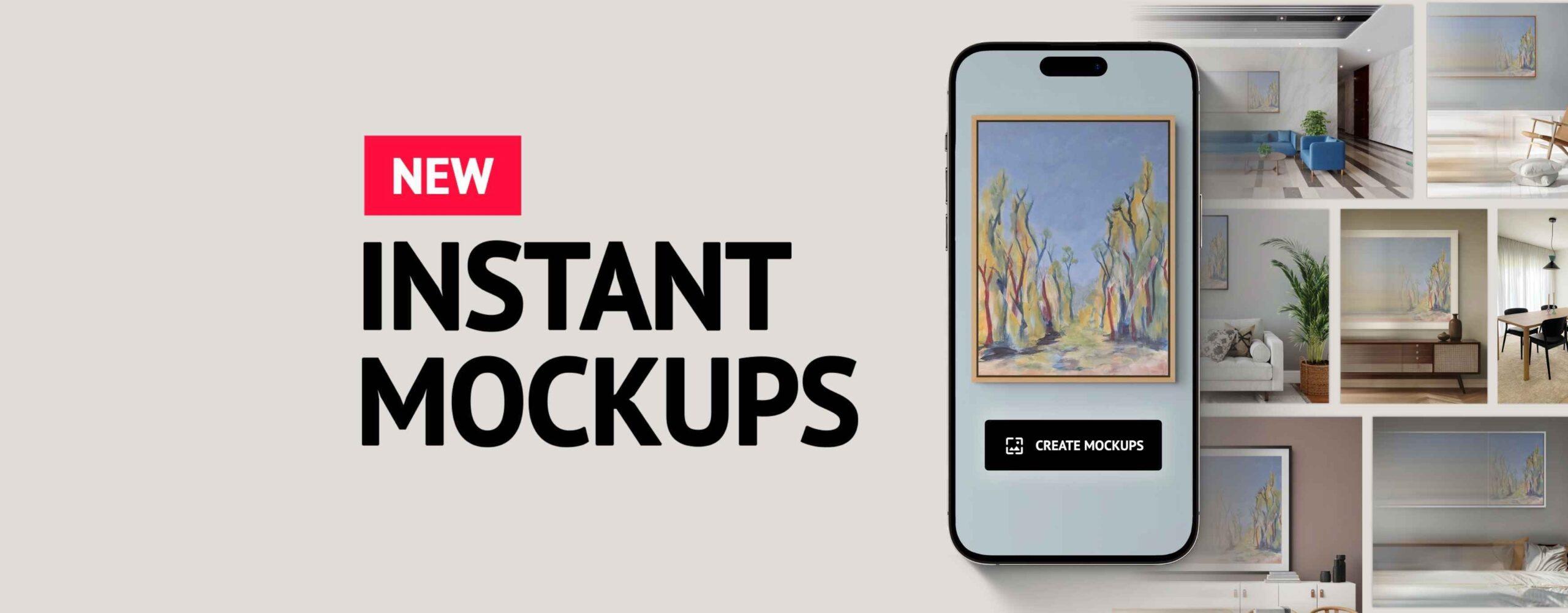
Speed and consistency at volume. Artists working through a full collection and galleries representing many artists can’t spend hours on each image, so the tool should produce polished visuals quickly and keep them consistent across every artist and show. With ArtPlacer’s Instant Mockups, you select up to three pieces and get 12 curated mockups in one click. Each one arrives framed, placed, and ready to share. You can also turn any mockup into a five-second video for Reels or Stories, with no editing software.
The collector’s own space. You want to be able to customize the visuals for each client. ArtPlacer’s Personal Spaces lets you place art in a photo of your collector’s room at true scale, so they can see exactly what the art would look like in the space. Artists, galleries, and art advisory services use it for remote clients, commissions, and exhibition proposals, making each conversation personal.
Art visualization features in short
When comparing marketing tools for artists, check how many visualization formats each one covers. A single “view in room” image solves only part of the problem. ArtPlacer combines an extensive Room Mockup library, instant batches, video, and collectors’ own rooms in one tool.
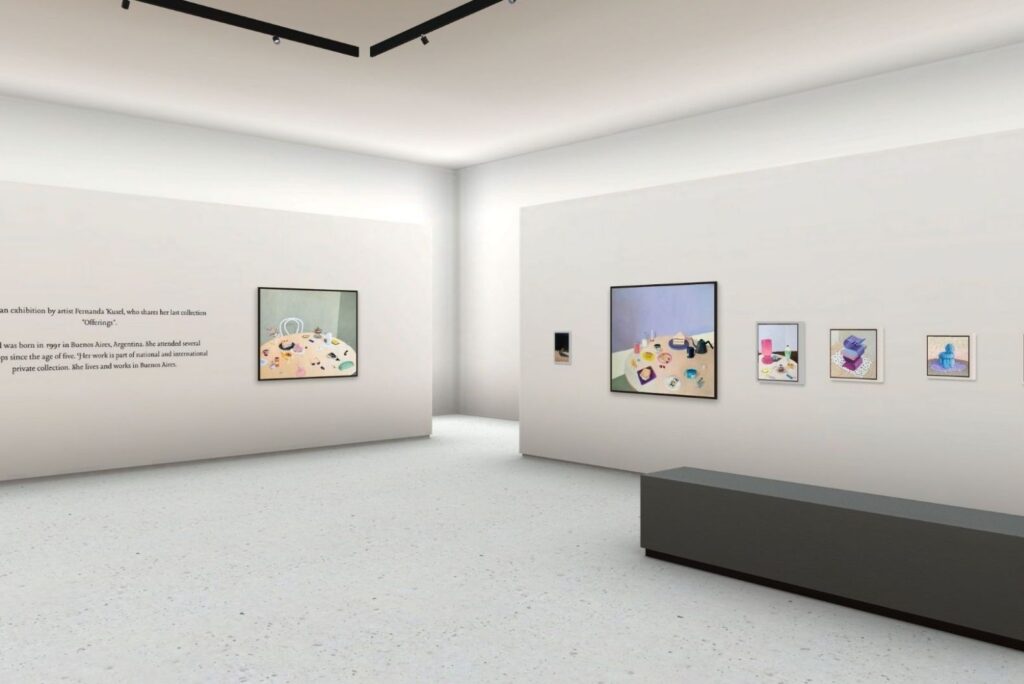
ArtPlacer’s Virtual Exhibitions give shows a 3D home online, open to collectors anywhere, at any hour. Include show and artist information, and create the perfect vibe by adding music.
What exhibition features should you look for in an art marketing tool?
Exhibitions drive sales, so your tool should support them online and in person. Look for two things: a virtual art gallery collectors can visit from anywhere, and a way to plan physical shows in advance.
An online gallery that works like a real one. A 3D virtual art gallery should feel like walking through a real space, not scrolling a web page. ArtPlacer’s Virtual Exhibitions let you choose a venue, customize the space, and display framed art or place sculpture on pedestals. You can add a show brochure, enable augmented reality, and embed the show on your website. Analytics then show who visited and which works drew attention.
Physical shows planned in advance. Hanging a show by trial and error costs time, money, and wear on the artwork. A digital art show planner solves this. With ArtPlacer’s Art Show Planner, you enter each wall’s measurements and drag artworks into place at true scale to play around with layouts and framing. You can share the finished layout as a blueprint with your installation team or fair organizers.
Exhibition features in short
Among the platforms in this comparison, only ArtPlacer covers both online exhibitions and physical show planning. Others offer image-based viewing rooms or limited virtual exhibits, if anything.
What tools help you sell art from your own website?
Many art marketing tools come with their own website builder. That suits artists and galleries starting from scratch, but it means migrating if you already have a site. Look for three things: compatibility with your current site, try-before-you-buy options on artwork pages, and data on how visitors use them.
Compatibility with the site you already run. Artlogic, FASO, and Art Storefronts run on their own website platforms. To use their tools, you usually rebuild your site on their system. That migration costs time, can hurt your search rankings, and makes switching tools harder later. Artwork Archive offers embeds for WordPress and Squarespace, but they share piece data rather than room visualization. ArtPlacer’s Website Integrations work with Shopify, Squarespace, WordPress, Wix, and custom sites, and plug smoothly into your existing setup. Whether you need a Shopify art visualizer or a WordPress art visualizer, setup takes a few clicks.
Try-before-you-buy on every artwork page. Collectors increasingly expect to see art in a room before buying online. Each ArtPlacer widget works as a view-in-room plugin, so visitors never leave your site. The Sample Room Widget places art in rooms you choose, and the Client Room Widget uses the visitor’s own photo. The AR Widget shows the piece at scale on their wall, using augmented reality, straight from their phone.
Insight into what collectors want. Built-in analytics in ArtPlacer’s Website Integrations show clicks per widget, top artworks, and top countries. You learn which pieces draw attention and where your collectors are, so you can fine-tune your follow-ups and marketing strategy.
Art website integration in short
When evaluating tools, ask whether they require you to move your site. If you’re starting from scratch, a built-in website builder can make sense; Artlogic, FASO, and Art Storefronts run on their own website platforms. ArtPlacer adds visualization to your existing site without a rebuild. The best art marketing platform for most artists and galleries works with their current setup, not against it.

What collector management features should an art marketing tool have?
A tool that only showcases art stops halfway through the sale. Collector interest often starts small: an online show visit, a QR scan at a fair, or a single inquiry. Look for a CRM that captures those signals, keeps their context, and helps you follow up.
Lead capture wherever collectors see your work. Interest that isn’t captured is easily lost. With ArtPlacer, collectors can inquire from Viewing Rooms, Virtual Exhibitions, your Discover Profile, or your Custom Mobile App. A QR code on your gallery wall or fair booth adds new subscribers on the spot. They all get added and categorized in your Inbox.
Context for every contact. Knowing what a collector liked makes follow-up easier. ArtPlacer saves each inquiry as a contact, with its source and the artwork it mentions.
Follow-ups that show the work. A text-only email asks collectors to imagine the piece. With ArtPlacer, you can send a customized mockup of their home with the art, a curated Presentation, or a private microsite instead. This is where marketing for art galleries and artists becomes a real sales conversation.
Contact management in short
Artlogic and Artwork Archive offer strong CRMs, especially for inventory-heavy businesses. If inventory management is your priority, they’re worth a look. ArtPlacer connects those records to the visual tools where collectors first show interest. That link is what separates art gallery marketing software from a simple contact list.
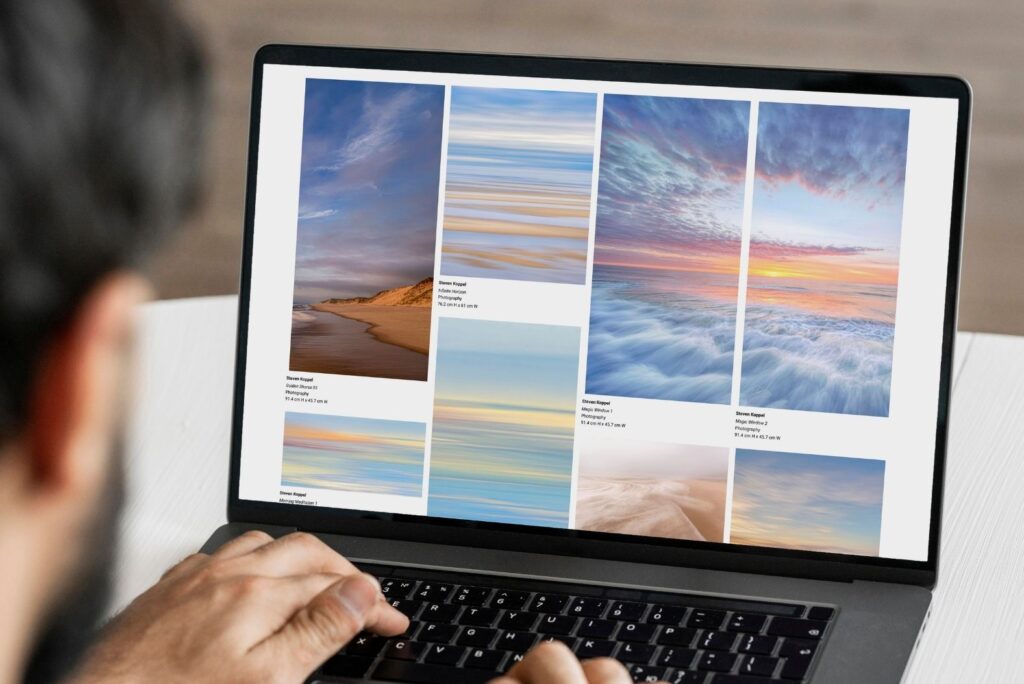
ArtPlacer’s Presentations features include Online Viewing Rooms, a microsite you can create for specific clients to share exclusive curations or collection offers.
Which art marketing tool is right for me?
Choosing a marketing tool is really a decision about how you want collectors to experience your work. Art is still bought on feeling, trust, relationships, and the confidence that a piece belongs somewhere. Whatever art marketing software you choose, it should help you tackle those areas in a way that’s intuitive and doesn’t require tech expertise.
That’s why the most useful tools fit into the way you already work. They meet collectors where they are: on your website, at a fair, or in their own living room. They also give you time back, so you can focus on the art and the relationships around it.
More of the art market is moving online, but the fundamentals stay the same. Collectors want to see the work clearly, imagine living with it, and feel personally looked after. Pick the tool that helps you do all three, and test it with your own work before committing. ArtPlacer offers a 14-day free trial, so you can see how your art looks in context before you decide.